
Book Your LL or DL Test Slot Online (Sarathi)
After you apply, you book a slot for your test on the Sarathi portal, the online LL test for a learner’s licence, or the driving test for a permanent DL. Here’s how to book each one, check available slots, and reschedule if needed.
Quick answer
On sarathi.parivahan.gov.in, open the Appointments menu and choose LL Test Slot Booking or DL Test Slot Booking. Enter your application number (or learner licence number) and date of birth, complete the captcha, then pick an available date and time. There’s no separate booking charge, the test fee is already part of your application.
LL test vs DL test
They’re two different tests at two different stages. Book the one that matches where you are.
LL test (learner’s licence)
A short online multiple-choice test on road signs and traffic rules, taken after you apply for a learner’s licence. In most states you can take it from home. Pass it and your LL is generated. Prepare with our LL practice test.
DL test (permanent licence)
The actual driving test at the RTO, taken after your LL is at least 30 days old and you’ve applied for a permanent DL. You drive a test track/route in front of an examiner.
New to the process? See our guides on applying for an LL and applying for a permanent DL, slot booking is one step inside those applications.
What you’ll need to book
- Your application number, given when you submitted the LL or DL application (the DL test screen also accepts your learner licence number instead)
- Your date of birth, as entered in the application
- Fee already paid: the test fee is collected during your application, so slot booking itself has no extra charge
- For the DL test: your LL must be at least 30 days old and still valid before a slot can be booked
Tip: check open dates first through Slots Enquiry (and the Holiday Calendar) so you don’t pick a day the RTO is closed.
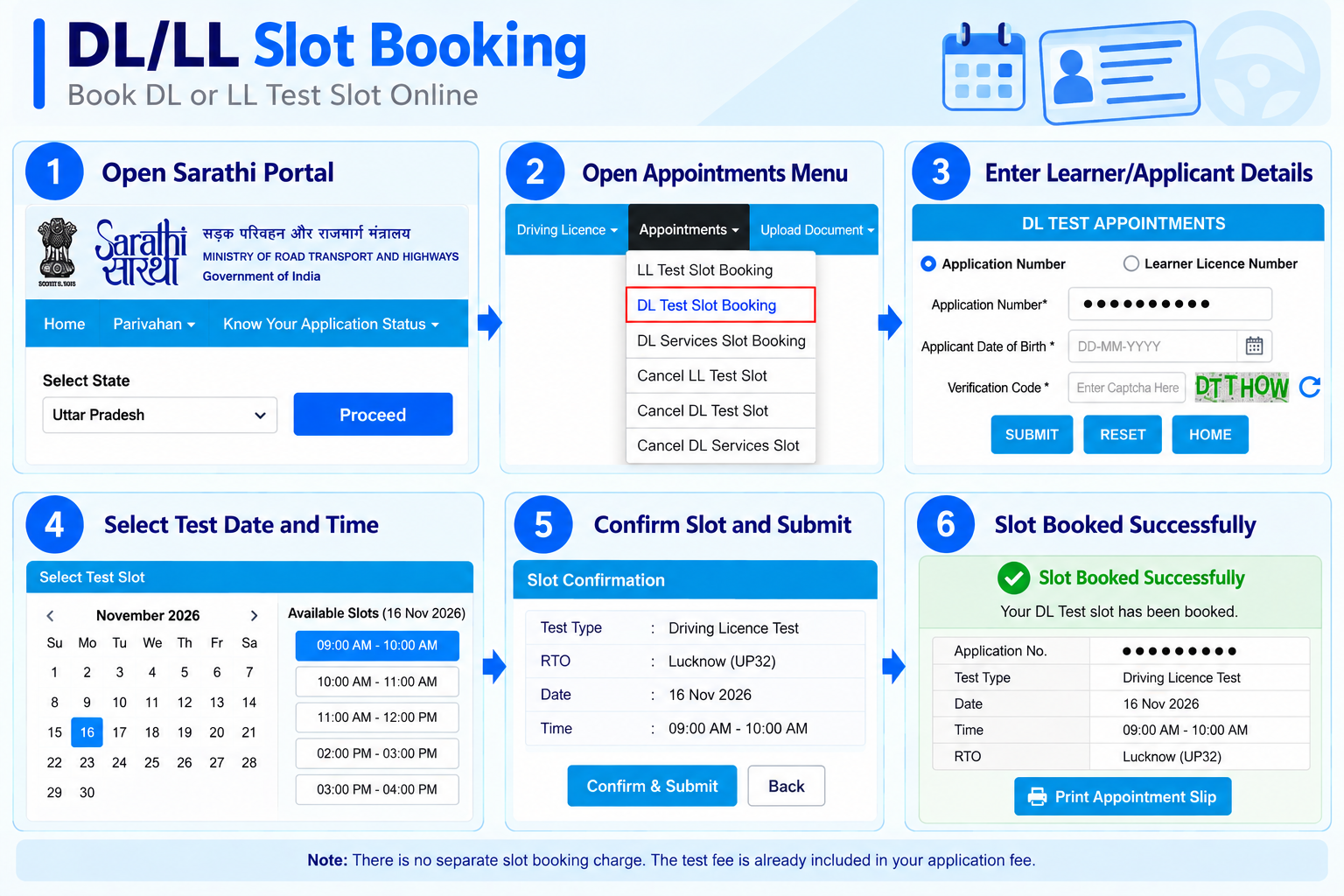
Book your LL test slot
-
Open Appointments on Sarathi
Go to sarathi.parivahan.gov.in, select your state, and from the Appointments menu choose LL Test Slot Booking.
-
Identify your application
Enter your Application Number and Applicant Date of Birth (DD-MM-YYYY), type the verification code (captcha), and click Submit.
-
Pick a date and time
The available LL test slots appear. Choose a date and time that suits you and confirm the booking.
-
Save the slot confirmation
Note or print the confirmed slot details. In most states the LL test is an online quiz you take at the booked time; pass it and your LL is issued.
Book your DL test slot
-
Open Appointments on Sarathi
On sarathi.parivahan.gov.in, from the Appointments menu choose DL Test Slot Booking.
-
Identify your application
Choose Application Number or Learner Licence Number, enter it with your Date of Birth and the captcha, then click Submit.
-
Pick an RTO date and time
Select an available driving-test slot at your RTO. Since this is an in-person test, make sure you can reach the RTO with a vehicle of the class you’re being tested for.
-
Confirm and carry the slip
Confirm the slot and print the appointment slip. Reach the RTO on time with your LL and the required documents to take the driving test.
Check slots, holidays and rescheduling
Sarathi has separate menus for checking availability and for cancelling a booked slot.
Slots Enquiry
Under Slots Enquiry, use LL Slots Enquiry, DL Slots Enquiry or DL/LL Services Slots Enquiry to see open dates before you book.
Holiday Calendar
The Holiday Calendar (also under Slots Enquiry) shows RTO holidays, avoid picking a closed day.
Cancel a test slot
Use Cancel LL Test Slot or Cancel DL Test Slot from the Appointments menu, then book a fresh slot.
Reschedule
There’s no direct “reschedule”, you cancel the existing slot and book a new one from the same Appointments menu.
What happens on test day
What the test involves, and what happens whether you pass or not.
LL test, on the day
A set of multiple-choice questions on road signs and traffic rules, with a state-set pass mark. In most states you take it online at your booked time.
Pass the LL test
Your learner’s licence is generated right away and can be downloaded from the portal, no waiting for a card by post.
DL test, on the day
You drive a test track or route in front of an RTO examiner, who checks control, signals and traffic response. Bring a vehicle of the class you applied for.
If you fail either test
You can rebook and retake after a short cooldown set by your RTO, usually without a fresh application. Just book a new slot.
Booking a slot for other DL services
The LL and DL test slots aren’t the only appointments on Sarathi.
Some licence services need their own slot, most commonly AEDL (adding a new vehicle class to your DL), which requires a driving test for the new class. For these, the Appointments menu has a separate DL Services Slot Booking option, and you can check availability under DL/LL Services Slots Enquiry.
To cancel one, use Cancel DL Services Slot from the same Appointments menu. A plain renewal, duplicate or address change does not need a test slot, that step only appears when a service involves a driving test.
Mistakes to avoid
- Trying to book a DL test before the 30-day gap from your LL issue date
- Mixing up the application number and DOB, they must match your application exactly
- Picking a slot on an RTO holiday, check the Holiday Calendar first
- Reaching the DL test without the right vehicle for the class you applied for
- Missing your slot, you’ll have to cancel and rebook, which can push your date back
Common questions
Is there a fee to book a test slot?
No separate booking fee. The LL or DL test fee is paid during your application, so booking the slot itself costs nothing extra.
When can I book the DL (driving) test?
Once your learner’s licence is at least 30 days old and still valid, and you’ve applied for the permanent DL. Before 30 days, the slot can’t be booked.
Can I reschedule a slot?
There’s no one-click reschedule. Cancel the booked slot (Cancel LL/DL Test Slot) and then book a new one.
What if I fail the test?
You can rebook and retake it after a short cooldown set by your RTO, usually without a fresh application. Book a new slot from the Appointments menu.
I don’t have my application number, what now?
For the DL test you can identify with your learner licence number instead. If you’ve lost both, recover the application number with our find application number guide.
Ready to book your slot?
This takes you straight to the official Sarathi portal. myrtobuddy.com is not affiliated with it.