
Find a Lost Driving Licence Application Number (Sarathi)
Lost the application number for your learner’s or driving licence? You can find it again on the official Sarathi portal with your name, date of birth and mobile number. Here is how, and what to do if the search shows nothing.
Quick answer
On sarathi.parivahan.gov.in, select your state, open Others and choose Find Application Number. Select the RTO where you applied, enter your name, date of birth and mobile number, fill the captcha and click submit. The search is free.
Why the application number matters
Most Sarathi services ask for it before they show you anything.
Checking your status
To see where your learner’s or driving licence application stands, Sarathi asks for the application number. See our licence status guide.
Booking or changing a test slot
Slot booking for the LL test or the driving test needs the application number to find your application. See our slot booking guide.
Paying fees and uploading documents
If you stopped half way, completing the payment or the upload usually starts from the application number.
Printing your form or receipt
Reprinting the application form or the fee receipt also needs it.
Lost your licence number, not the application number? They are different. The application number identifies your application, while the DL number is printed on the licence once it is issued. If you have lost the licence itself, see our duplicate licence guide, and if you only need a copy, our DL download guide.
Check these first
You may already have the number without searching.
The SMS from Sarathi
When you apply, the portal usually sends the application number by SMS to the mobile number you gave. Search your messages for it.
The acknowledgement or form
The acknowledgement page shown after you applied, and the printed or saved application form, carry the application number.
The fee receipt
The receipt for the fee you paid online also shows the application number.
Your downloads folder
Look for a PDF saved from the Sarathi portal on your phone or computer.
Keep these ready
Enter the details exactly as you gave them in the application.
State and RTO
The state and the RTO office where you applied for the licence.
Your name
At least your first name. The portal lets you search by first and middle name, by last name, or by a combination of two.
Date of birth
In DD-MM-YYYY format, as entered in the application.
Mobile number
The mobile number you gave when you applied.
Step-by-step: find your application number on Sarathi
These steps follow the Uttar Pradesh page on Sarathi. Other states use a similar layout, but menus can differ slightly.
-
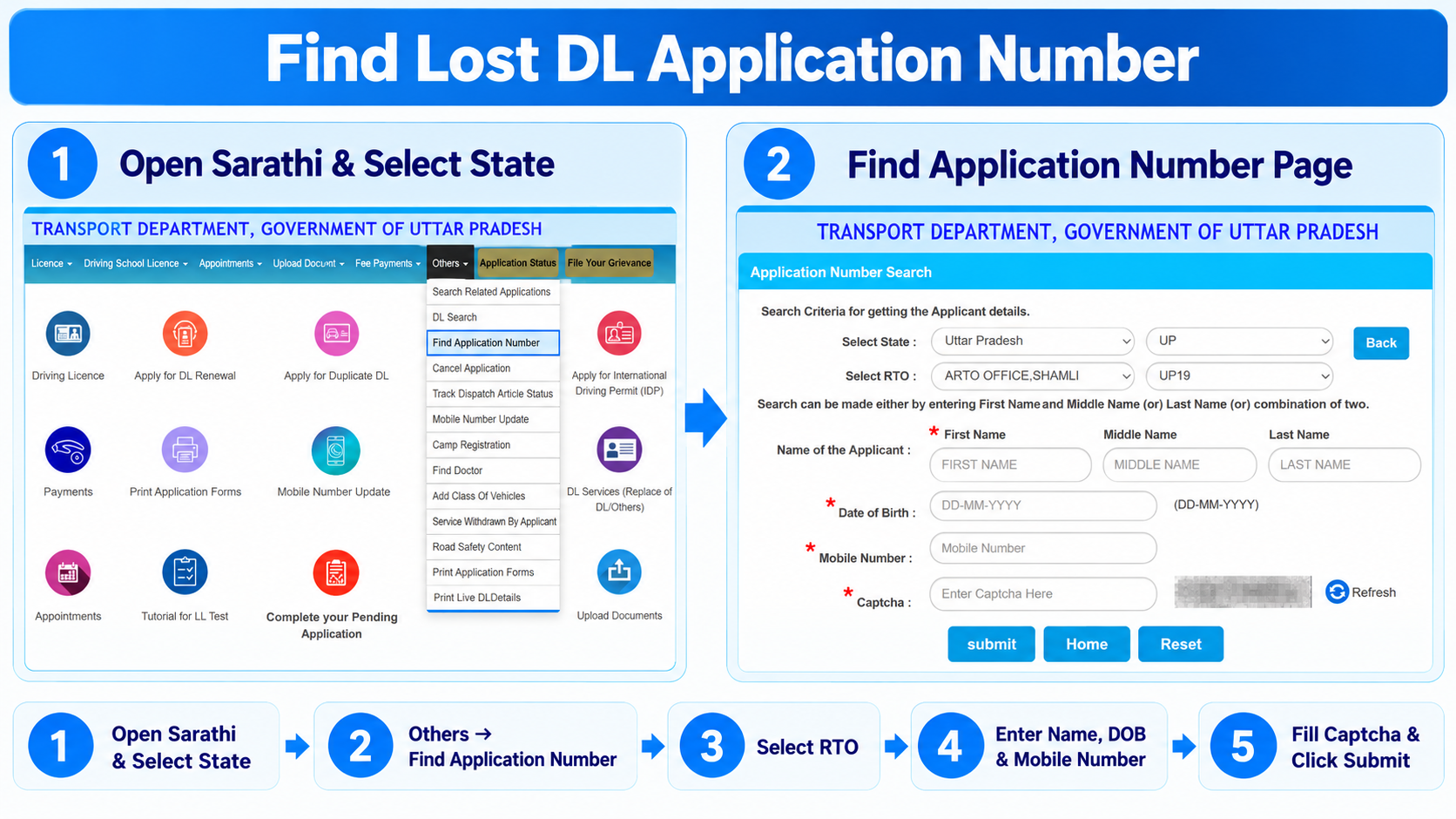
Open Sarathi and choose your state
Go to sarathi.parivahan.gov.in and select the state where you applied. This opens the driving licence services page for that state.
-
Open the Others menu
In the top menu, click Others. From the list, choose Find Application Number.
-
Select your state and RTO
On the Application Number Search page, check that the state is correct and select the RTO where you applied. The RTO code, such as UP19, fills in next to it.
-
Enter your name, date of birth and mobile number
Type your first name, and add the middle or last name if you want a narrower search. Then enter your date of birth in DD-MM-YYYY format and your mobile number.
-
Enter the captcha and submit
Type the characters shown in the captcha, using Refresh if it is hard to read, and click submit. Some states also send an OTP to your mobile number to confirm it is you. The portal then shows the application details that match what you entered. Note down the application number and keep it safe.
If the search shows nothing
Usually it is a small mismatch between what you type and what is in the application.
Check the spelling of your name
Type it the way it was entered in the application. Try only the first name, or only the last name, if the full name does not match.
Check the RTO
Searching under a different RTO in the same state will not find your application.
Check the date and mobile number
The date must be in DD-MM-YYYY format, and the mobile number must be the one used in the application.
Still not found?
Visit the RTO where you applied with your ID proof. The office can look up your application from its records.
What to do with it next
- Save it in more than one place. Take a screenshot and write it down, so you do not have to search again.
- Check your status. Our licence status guide shows how to track the application.
- Book or change your test slot. See our slot booking guide.
- Finish a pending application. If a fee or document is still pending, complete it from the Sarathi home page using the same number.
Other useful options in the same menu
The Others menu on Sarathi has a few more services that help with an application.
Search Related Applications
Another search option for applications on Sarathi. Check which details your state’s page asks for.
Complete your Pending Application
Resume an application where the fee payment or document upload is still pending.
Print Application Forms
Reprint your application form once you have the application number.
Cancel Application
Withdraw an application you no longer need, for example a duplicate one you made by mistake.
What these need
Most of these ask for your application number or the same personal details. Names and steps can differ by state, so follow what your state’s Sarathi page shows.
Mistakes to avoid
- Starting a new application. Find the number for the one you already made instead of applying again.
- Choosing the wrong RTO. Select the office where you applied, not the one closest to you now.
- Sharing your details with an agent. Finding the number is free on Sarathi. Do not share your date of birth, mobile number or OTP with anyone who offers to find it for a fee.
Common questions
Can I find my DL application number without the mobile number?
The Find Application Number page on Sarathi asks for the mobile number. If you no longer have it, check your SMS, the printed form or the fee receipt, or visit your RTO.
Is there a fee to find the application number?
No. Finding the application number on the official Sarathi portal is free.
Does this work for a learner’s licence application too?
The same search is used for licence applications made on Sarathi, including learner’s licence applications.
I applied at the RTO counter. Can I still find it online?
If the application was entered in Sarathi, the search should find it with the same details. If it does not, ask the RTO where you applied.
Is the application number the same as my DL number?
No. The application number identifies your application. The driving licence number is issued once the licence is approved.
Ready to find your application number?
This takes you straight to the official Sarathi portal. myrtobuddy.com is not affiliated with it.