
Apply for a Duplicate Driving Licence (Lost or Damaged)
Lost your DL, or has it torn or faded? You don’t retake any test, you apply for a duplicate with the same licence number. Here’s the full process on the Sarathi portal, the documents you’ll need, and the fee.
Quick answer
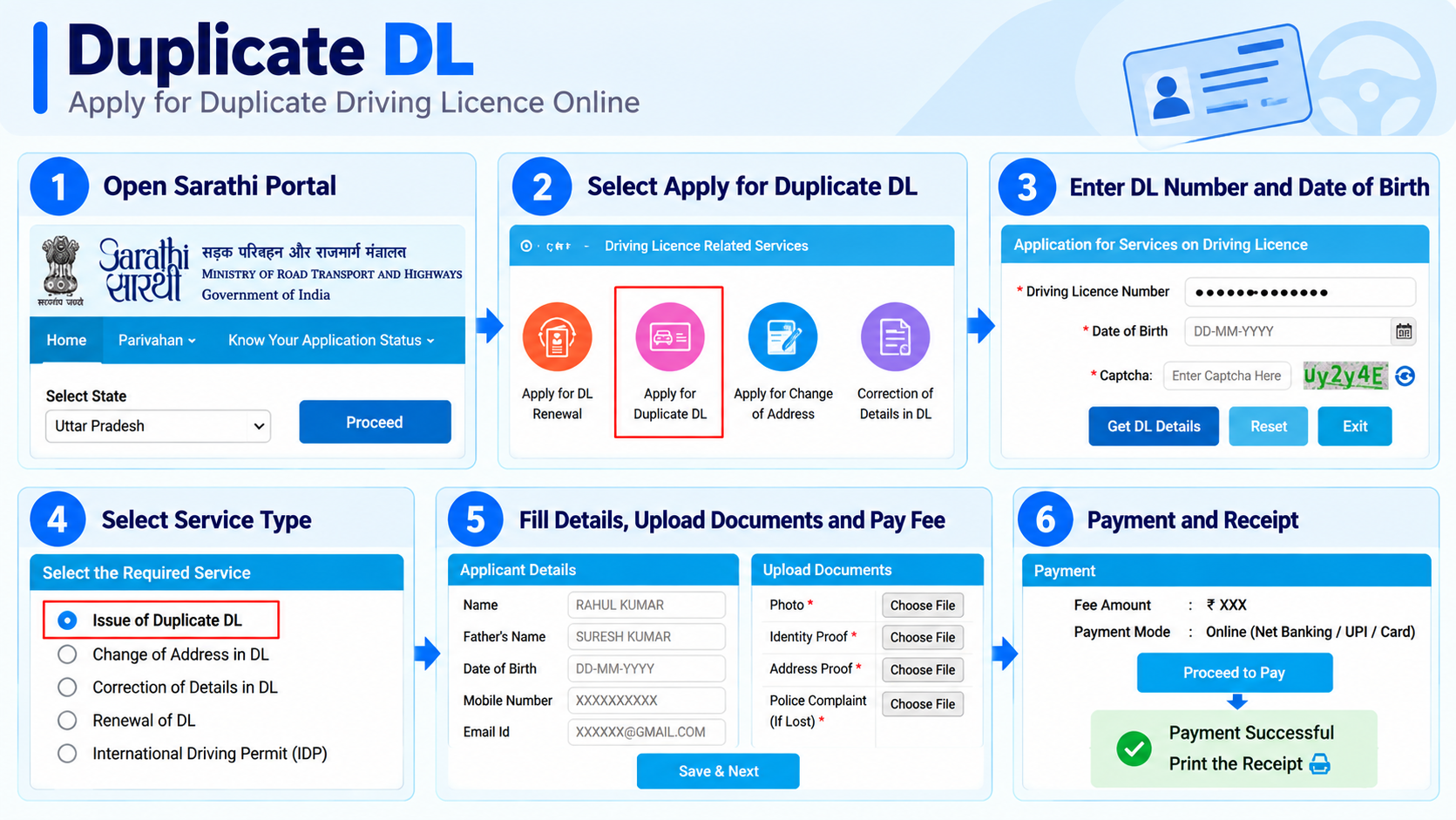
On sarathi.parivahan.gov.in, select your state, open Apply for Duplicate DL (Services on Driving Licence), enter your DL number and date of birth, pick Issue of Duplicate DL, fill your details, upload documents (plus a police complaint or affidavit if your state asks for one for a lost DL), pay the fee, and print the receipt. Your licence number stays the same, no test needed.
When you need a duplicate DL
A duplicate is a fresh copy of the same licence, same number, same validity, same driving history.
Lost or stolen
The card is gone. Depending on your state, you may need a police complaint or an affidavit.
Torn or damaged
The card is broken, cracked or unreadable. Nothing needed, you surrender the damaged card.
Faded / worn print
An old card where the photo or details have worn off and can’t be read clearly.
Mutilated / defaced
Any card that’s no longer in usable condition qualifies for a duplicate.
No re-test, no new number. A duplicate DL doesn’t touch your driving test, validity or record, it’s just a reissued card. If your DL has actually expired, that’s a renewal, not a duplicate.
Documents you’ll need
The exact set varies slightly by state and by whether the DL was lost or just damaged.
Form LLD — the application for a duplicate licence
Police complaint or affidavit — if your state asks for it (lost or stolen DL)
The damaged DL — to surrender, if torn/defaced
ID & address proof — Aadhaar, passport, voter ID, etc.
Passport photo — recent, as your RTO requires
Date of birth proof — if asked by your state
Lost DL? Some RTOs ask for a police complaint, some ask for a notarised affidavit confirming the loss, and some ask for both. It differs by state, so check the document list shown for your state on Sarathi before you apply. If it’s needed, arrange it first, as it can take the longest.
Step-by-step: apply on Sarathi
-
Open Sarathi and select your state
Go to sarathi.parivahan.gov.in and pick your state. From the Driving Licence menu, choose Apply for Duplicate DL (it opens the “Services on Driving Licence” flow).
-
Enter your DL number and date of birth
On the Application for Services on Driving Licence screen, enter your Driving Licence Number and Date of Birth, fill the captcha, tick the privacy policy box, and click Proceed. (The DL number can be entered in any format.)
-
Select “Issue of Duplicate DL”
Once your DL is accepted, the portal shows the services you’re eligible for. Pick Issue of Duplicate DL from that list.
-
Fill applicant / request details
Review and complete your personal and address details, and select the reason (lost, damaged, etc.). Pick the RTO under your current present address.
-
Upload documents
Upload the required documents: ID/address proof, plus a police complaint or affidavit if your state asks for one for a lost DL. Some states also ask for photo and signature here.
-
Pay the fee
Pay the applicable fee online, then verify the payment status is reflected against your application.
-
Print the receipt
Download and print your application receipt, and save the application number to track it later.
A duplicate DL doesn’t need the test-slot booking step, that only applies when you’re adding a new vehicle class (AEDL). Track your application anytime with our DL status guide.
Fee and how long it takes
The fee is modest and set centrally; states may add their own charges on top.
| Item | Typical amount |
|---|---|
| Duplicate DL fee (central base) | ₹200 |
| With state charges added | ₹200–₹500 |
| New smart card by post | ~7–30 days |
The physical card arrives by post, and until it does, a virtual DL on DigiLocker or mParivahan is legally valid to carry, so you’re never left without proof.
Can you drive while you wait?
Yes, as long as you can produce a valid licence in some form.
Your licence itself is still valid, only the physical card is being replaced. A digital DL in DigiLocker or mParivahan carries the same legal weight as the card under the Motor Vehicles Act, so pull it into one of those apps and you’re covered on the road.
- Do this first: if your card is lost, open DigiLocker or mParivahan and fetch your DL, don’t wait for the new card.
- Show the app, not a screenshot: only the live document counts, a screenshot doesn’t.
- Need a printed copy too? See our guide to downloading your DL.
After you submit: tracking your duplicate DL
Use the application number from your receipt to follow it on Sarathi. It moves through these stages.
Application received
Your request and payment are logged and queued at the RTO.
Documents under verification
The RTO checks your uploads, a missing complaint or affidavit (where your state requires it) for a lost DL usually shows up here.
Approved & card printed
Once cleared, the duplicate DL is approved and the new smart card is generated.
Dispatched by post
The card is sent to your registered address, this is the stage that takes most of the 7–30 days.
Check it anytime with our DL application status guide.
Other DL services on the same screen
“Apply for Duplicate DL” opens a shared Services on Driving Licence screen. Once your DL is accepted, you’ll only see the services you’re eligible for, from this full list:
Issue of Duplicate DL
Additional Endorsement to DL (AEDL)
Change of Name in DL
Change of Date of Birth in DL
Change of Photo and Signature in DL
Replacement of DL
Issue of PSV Badge to a Driver
Endorsement to Drive Hazardous Material
Endorsement to Drive in Hill Region
Issue International Driving Permit
DL Extract
AEDL for Defence / Foreign DL Holder
Surrender of COV(s) / PSV Badge(s)
COV Conversion (some states only)
Permanent Surrender of DL
Mistakes that hold up a duplicate DL
- Not checking your state’s document list for a lost DL, some RTOs need a police complaint or affidavit, and missing it can delay the application
- Confusing a duplicate with a renewal, an expired DL needs renewal, not a duplicate
- Selecting an RTO that doesn’t match your present address
- Expecting a test-slot step, a plain duplicate doesn’t need one
- Uploading a blurry document scan that the portal rejects
Common questions
Does my licence number change on a duplicate?
No. A duplicate DL keeps the same licence number, validity and driving record, only the physical card is reissued.
Do I have to take a driving test again?
No. There’s no test for a duplicate. Tests only apply to a fresh DL or when adding a new vehicle class (AEDL).
Is a police complaint or affidavit compulsory for a lost DL?
Not always. It depends on your state and RTO. Some ask for a police complaint, some for a notarised affidavit, some for both. Check the document list for your state on Sarathi before applying. For a torn or damaged card you surrender the old one instead.
What does a duplicate DL cost?
Around ₹200 under central rules, typically ₹200–₹500 once state charges are added. Confirm the exact amount on Sarathi before paying.
My DL is expired, do I apply for a duplicate?
No, an expired DL needs a renewal. A duplicate is only for replacing a lost or damaged card whose licence is still valid.
Ready to apply for a duplicate DL?
This takes you straight to the official Sarathi portal. myrtobuddy.com is not affiliated with it.