
Apply for a Learner’s Licence (LL) Online
Here’s the full process to apply for your Learner’s Licence on the Sarathi portal, from filling the form to taking the online LL test, without visiting an RTO in most states.
Quick answer
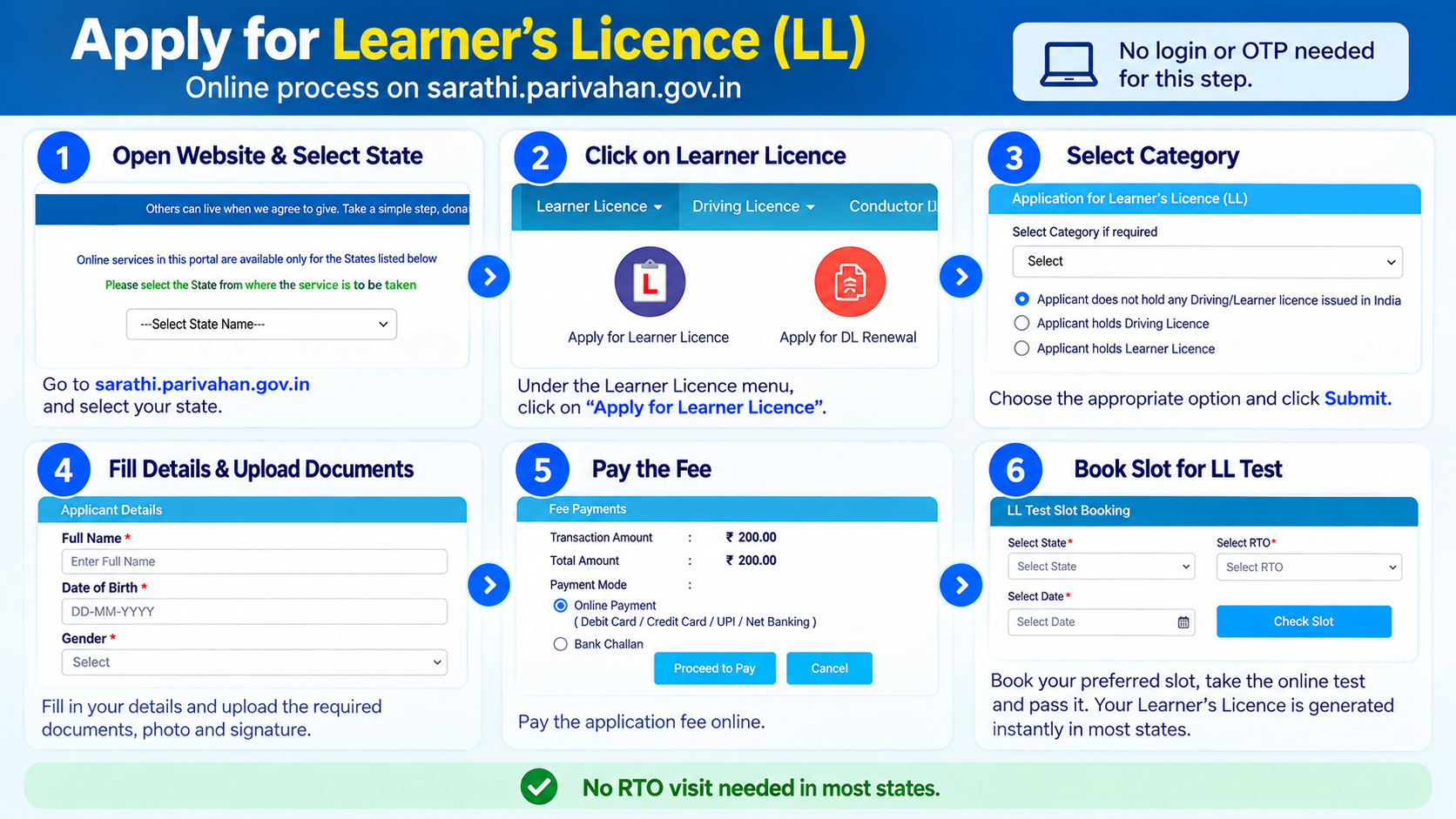
Go to sarathi.parivahan.gov.in, select your state, and choose Apply for Learner Licence under the Learner Licence menu. Fill in your details, upload your documents, photo and signature, pay the fee, then book your slot for the online LL test. Pass it and your Learner’s Licence is generated instantly, no RTO visit needed in most states.
What you’ll need
- A passport-size photo and signature, scanned or photographed clearly for upload
- Aadhaar, if you want to use OTP authentication (this auto-fills most of your details and speeds things up). Without Aadhaar, you can still apply, you’ll just fill the form manually and upload address/age proof yourself
- A medical certificate (Form 1), only if your vehicle class or a declared health condition requires one, it isn’t needed for a standard two-wheeler or car LL
- Minimum age: 16 for gearless two-wheelers up to 50cc (with a guardian’s consent form, valid only till you turn 18), 18 for other classes like motorcycles with gear (MCWG) or cars (LMV)
New to all this? Our driving licence guide covers every step from LL to renewal in one place.
Which vehicle class should you pick?
This decides what you can legally drive once your LL, and later your full DL, is issued. You can select more than one in the same application.
MCWOG
Motorcycle Without Gear, scooters and other gearless two-wheelers. At 16, only up to 50cc and with a guardian’s consent.
MCWG
Motorcycle With Gear, geared two-wheelers of any engine capacity.
LMV
Light Motor Vehicle, cars and other non-transport vehicles up to 7,500kg.
LMV-TR
Transport version of LMV, for commercial or taxi-plated vehicles, usually needs extra eligibility.
Step-by-step: apply for your Learner’s Licence
-
Go to the Sarathi portal and select your state
Open sarathi.parivahan.gov.in and pick the state you want the LL from. Each state runs its own instance, so this decides which RTO your application goes to.
-
Choose “Apply for Learner Licence”
From the Learner Licence menu in the top nav, click the Apply for Learner Licence tile. The exact wording can shift slightly between states, but it’s always grouped under Learner Licence services.
-
Select your category
On the Application for Learner’s Licence (LL) screen, choose the option that fits you, most first-time applicants pick “Applicant does not hold any Driving/Learner licence issued in India.” If you already hold a DL or LL (say, for a different vehicle class), pick the matching option instead. Click Submit to continue.
-
Authenticate with Aadhaar, or continue without it
Choosing Aadhaar OTP auto-fills your name, address and date of birth from UIDAI records, the fastest route. If you’d rather not use Aadhaar, select the manual option and you’ll fill everything yourself and upload proof documents.
-
Fill Application Details (LL)
Complete your personal and address details, then select the vehicle class(es) you want the LL for, for example MCWG for a motorcycle with gear or LMV for a car. Choose carefully: adding a class later usually means applying again for that class specifically.
-
Upload Documents
Upload your address and age proof as asked on this screen. If you authenticated with full Aadhaar eKYC, this step is usually skipped since your details are already verified.
-
Upload Photo and Signature
Upload a clear photo and signature. If you did eKYC through Aadhaar, you only need to upload your signature, your photo is pulled from Aadhaar records automatically.
-
Fee Payment
Review your application and pay the fee online through the payment gateway shown on the portal.
-
Verify the Payment Status
Confirm your payment has gone through and is reflected against your application before moving on. If it shows pending or failed, don’t start a new application, retry payment against the same one.
-
Print the Receipt
Download and print your application receipt. Keep it handy, you may need it at the RTO or if you ever have to follow up on this application.
-
LL Slot Book
Book your slot for the Learner’s Licence test, the short online multiple-choice quiz on road signs and traffic rules. Our slot booking guide shows how, and our LL practice test helps you prepare. Once you pass it on your booked slot, your Learner’s Licence is generated and ready to download from the portal.
After you submit, what to expect
Once your application and test are done, it’ll land in one of these outcomes. Not sure where yours stands? Check anytime with our application status guide.
Slot booked
Your payment is confirmed and a test slot is reserved. Show up (or log in, for online slots) at the booked time to attempt it.
Test passed
Your Learner’s Licence is generated instantly. Download and print it from the portal, you don’t need to wait for a physical copy by post.
Test failed
You can rebook and retake it after a short cooldown, typically around 7 days, directly from the portal without filing a new application.
Payment pending or failed
Your application stays incomplete until the fee clears. Retry payment from the same application, don’t start a fresh one.
Rules to follow once you have your LL
Display an “L” sign, a red L on a white background, on the front and back of the vehicle while practicing.
Don’t drive alone for most classes, you must be accompanied by someone seated beside you who holds a valid permanent licence for that same vehicle class.
Carry your LL (printed or the portal’s digital copy) with you whenever you’re practicing, along with the vehicle’s own documents.
Mistakes that slow this down
- Selecting the wrong vehicle class, you’ll usually need a fresh application to add another one
- Name mismatch between Aadhaar and other documents, this is one of the most common reasons applications get flagged
- Uploading a blurry or oversized photo/signature scan that the portal rejects
- Skipping the medical certificate when your vehicle class or a declared condition requires one
Common questions
How much does an LL application cost?
Under central rules (CMVR Rule 81), it’s ₹150 for issue of the Learner’s Licence (per vehicle class) plus ₹50 for the LL test, so ₹200 total at base rates. States commonly add their own charges on top, so confirm the final amount shown on Sarathi before you pay.
How long is a Learner’s Licence valid?
Six months from the date it’s issued. You’ll need to apply for your permanent licence within that window.
Can I apply without Aadhaar?
Yes. You’ll just fill the form manually and upload your own address and age proof instead of using Aadhaar eKYC to auto-fill it.
When can I apply for a permanent licence?
Any time from 30 days after your LL is issued, up until it expires at 6 months. Applying before the 30-day mark isn’t allowed. See our guide to applying for your permanent DL when you’re ready.
Is there a minimum age?
16, for gearless two-wheelers up to 50cc with a guardian’s consent form (valid only till you turn 18). For other classes like MCWG or LMV, it’s 18.
Ready to apply?
This takes you straight to the official Sarathi portal. myrtobuddy.com is not affiliated with it.