
Book a Fancy / VIP Registration Number Online (Parivahan)
Want a special number for your new vehicle? The official Fancy Number portal lets you check available numbers, join the e-auction for fancy ones, and follow your result online. Here is how it works, what to check before you bid, and how to avoid lookalike sites and agents.
Quick answer
Open fancy.parivahan.gov.in, select your state and RTO, and check Series Status and All Available (Fancy/Choice) Numbers. Orange numbers are fancy, green ones are running or choice numbers. Fancy numbers are allotted through the portal’s e-auction: you bid, then check the result under View e-Auction Result. Fees, deposits and deadlines are set by the state, so read what the portal shows before you pay.
Fancy numbers vs choice numbers
The portal shows both kinds on one screen, colour coded.
Fancy numbers (orange)
Special numbers such as repeating digits, round numbers or popular combinations. These are generally allotted through the portal’s e-auction, where the highest bidder wins.
Running / choice numbers (green)
Ordinary numbers in a series that you can pick yourself. On the portal they are marked For Running/Choice Numbers.
What usually counts as fancy? In one Agra RTO series we looked at, the orange fancy numbers included patterns like 0007, 0786, 0808, 0888, 0999, 1122, 1133, 2000, 2222, 2323 and 2828: repeating digits, round numbers, paired digits and popular lucky numbers. An ordinary number such as 2145 showed in green. Which numbers are fancy can differ by state, RTO and series, so go by the colour on the portal.
The list also shows which vehicle type it is for, for example Non-Transport. Pick a series that matches your vehicle. What applies to a number, including how it is allotted, is shown on the portal when you select it, and it can differ by state.
Before you start
- The state and RTO where you will register the vehicle. A number is tied to that RTO, so choose it carefully. Not sure of the code? Use our RTO code finder.
- Your vehicle type, transport or non-transport, so you look at the right series.
- A working mobile number and email. The portal asks you to register as a user before you can apply, so keep both handy.
- An online payment method for the portal’s payment page.
- A budget you can actually pay. Fancy numbers go to the highest bidder, and prices can rise quickly.
Booking a fancy number is for a vehicle you are registering. If you are still deciding on the vehicle and paperwork, see our new vehicle registration guide first.
Step-by-step: find and select your number
-
Open the official portal
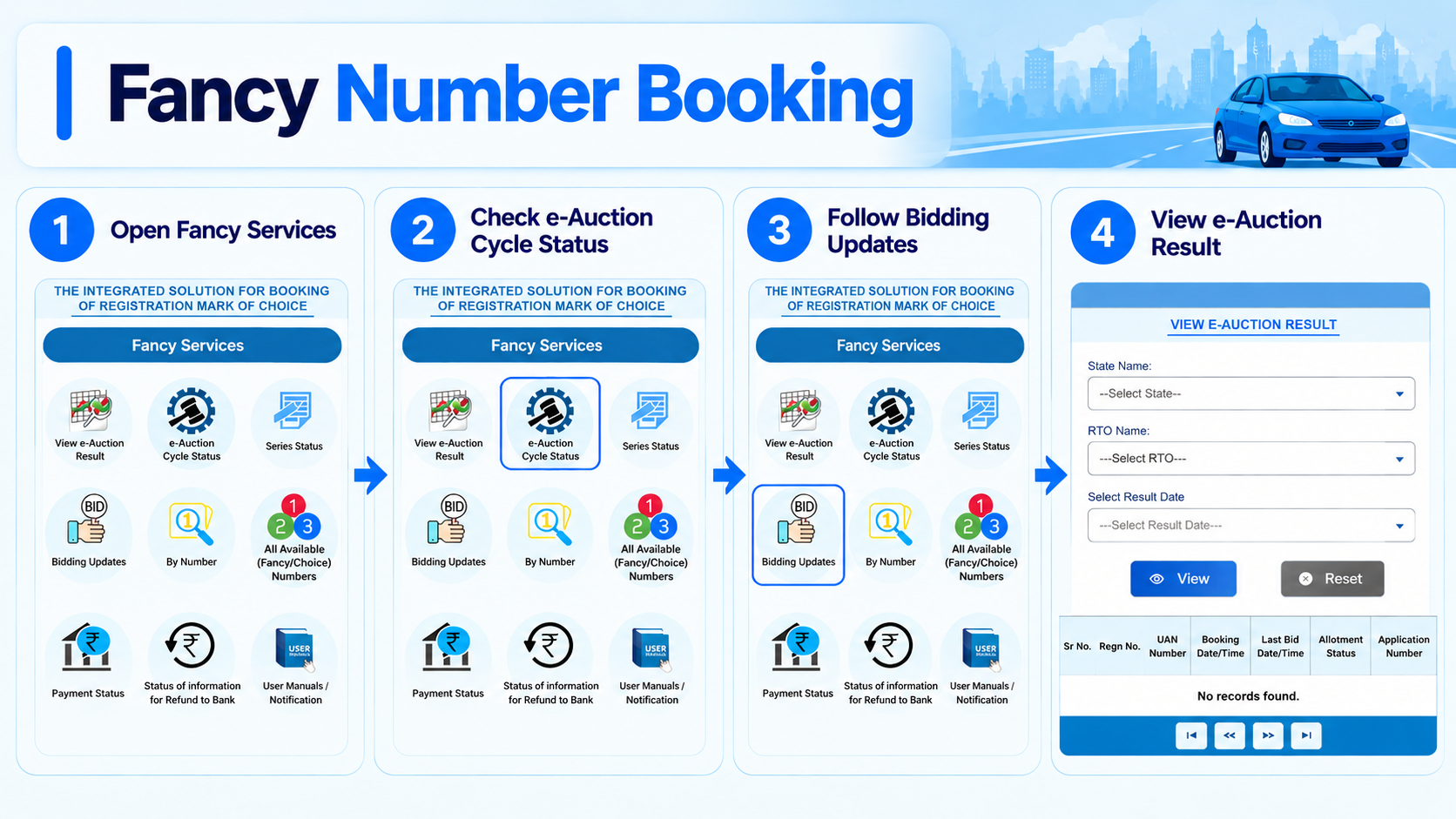
Type fancy.parivahan.gov.in into your browser yourself. The home screen shows Fancy Services and a menu with Home, Bidding, Status Details and Payment options.
-
Register and log in
Create your user account on the portal and log in before you apply. Follow the registration screens and keep your login details safe. Never share your password or OTP with anyone.
-
Check Series Status
Open Series Status and choose your state and RTO. The table lists each series name (for example UP11AQ), the date it opened, whether it is Transport or Non-Transport, and the start and end range of numbers.
-
Browse available numbers
Open All Available (Fancy/Choice) Numbers. Select the state, RTO and vehicle series. Orange numbers are fancy and green ones are running or choice numbers. If you already have one number in mind, the By Number service lets you look for it directly.
-
Select the number and pay as the portal directs
Choose your number and follow the portal’s application and payment screens. The amounts, and whether a number goes to bidding, are shown there, so rely on the portal and not on a figure from another website. Save the application number or UAN you get, since you will need it to track the result.
Cannot find the number you want? It may already be booked or allotted, or that series may not have opened yet. Check the Open On date in Series Status, try another series under the same RTO, or look again when a new series opens. The number list only shows what is available at that moment.
Bidding and checking the result
For fancy numbers, the auction runs in cycles. These are the screens you will use.
-
Check e-Auction Cycle Status
Open e-Auction Cycle Status to see where the current auction cycle stands, so you know when bidding opens and closes.
-
Follow Bidding Updates
From the Bidding menu, open Bidding Updates to see how bidding is going on the numbers you applied for. Bid only within the limit you are ready to pay.
-
Open View e-Auction Result
After the cycle closes, go to View e-Auction Result. Select the state, RTO and result date, then click View.
-
Read your allotment status
The result table lists the registration number, your UAN, booking and last bid date and time, the allotment status and the application number. If it says “No records found”, check that the state, RTO and result date match your application.
Bidding tips: decide your maximum amount before the cycle starts and stick to it. Note when the cycle closes so you do not miss it. Pay from a bank account you can trace, because a refund generally goes back to the account the payment came from. And keep your UAN and application number saved until the whole process is over.
After the result: if you win, and if you do not
Payment and refund follow the state’s rules. The portal has a status service for each.
If you win
Pay any balance amount within the deadline the portal or your state gives you. Missing it can mean the amount you already paid is forfeited and the number moves to the next bidder.
Then register the vehicle
The number has to be used for your vehicle within a limited time, and this period differs by state. If the vehicle is not registered in time, the reservation can lapse.
If you do not win
The amount you paid toward the bid is generally refunded to the bank account it was paid from after the auction, as per state rules. Some states may ask for a formal document at the RTO to process it.
Track payments and refunds
Use Payment Status to check a payment, and Status of information for Refund to Bank to follow a refund. User Manuals / Notification has the official guides.
After registration: your vehicle needs a High Security Registration Plate showing the new number. See our HSRP guide for how that works.
Read this before you bid
- Rules differ by state. Registration fee, deposit, payment deadline and how long the number stays reserved are not the same everywhere. Read the notice for your state on the portal.
- Some fees, such as a registration or processing fee, may be non-refundable even if you do not win. Check before you pay.
- A winning bid is a commitment. In one Haryana auction, the winner of HR88B8888, a bid of about Rs 1.17 crore, did not pay in time, the Rs 10,000 security deposit was forfeited and the number was put up for auction again. Amounts and rules change, so treat this only as a reminder to bid what you can pay.
- Choose the right RTO. A number is meant for a vehicle registered under that RTO. A wrong choice can cost you the amount you paid.
- A number is not guaranteed until the result shows it allotted to you.
Avoid lookalike sites and agents
A lot of websites and agents talk about fancy numbers. Only one portal is official.
- The official address is fancy.parivahan.gov.in. Type it yourself instead of using a link from a message, an ad or a search result page.
- Do not pay anyone who promises a guaranteed number. Fancy numbers go to the highest bidder in the e-auction.
- Pay only through the portal’s own payment page. Never transfer money to a personal UPI ID or bank account.
- Never share your OTP, password, card PIN or CVV with an agent or anyone else.
- If you paid a fake site or person, tell your bank at once and report it at cybercrime.gov.in or call 1930.
Common questions
How much does a fancy number cost?
It depends on the number, the series, the state and how many people bid. The portal shows what applies to your number, so do not rely on a price quoted elsewhere.
What is the difference between fancy and choice numbers?
Fancy numbers are the special ones, shown in orange, and are generally allotted through e-auction. Running or choice numbers, shown in green, are ordinary numbers you can pick.
Do I get a refund if I do not win?
Generally the amount paid toward the bid is refunded to the bank account it came from, as per your state’s rules. Some fees may not be refundable. Follow it under Status of information for Refund to Bank.
What if I win but do not pay or register the vehicle in time?
You can lose the amount already paid, and the number can go to another bidder or back to the RTO. The deadlines depend on your state, so note them when you win.
Which RTO should I choose?
The RTO where you will register the vehicle. The number is meant for a vehicle registered there.
Where can I see who got a number?
Use View e-Auction Result. Select the state, RTO and result date, and click View. It shows the registration number, UAN and allotment status.
Ready to look for your number?
This takes you straight to the official Fancy Number portal. myrtobuddy.com is not affiliated with it.