
Change Address in RC Online (Vahan Portal)
Moved to a new home? Your registration certificate (RC) has to carry your new address. Here is how to start an address change on the official Vahan portal, what to keep ready, and what to do if you have moved to another state.
Quick answer
On vahan.parivahan.gov.in, choose Registering Authority, select your state and RTO, and click Proceed. Then open RC Related Services, pick Change of Address (State Series Only), enter your registration number and the last 5 characters of the chassis number, and click Verify Details. The law asks you to inform the registering authority within 30 days of moving. Fees and the documents asked for depend on your state, so follow what the portal shows.
Why updating your RC address matters
An old address on your RC is more than a paperwork problem.
Notices go to the old address
Challan notices and other official letters are sent to the address on record. If you have moved, you may never see them, and a small dues problem can grow.
RC delivery goes astray
The updated or duplicate RC is posted to the address in the records. A wrong address means it can be lost or returned.
Selling gets harder
A mismatch between your RC address and your current address proof can slow down a transfer of ownership when you sell.
Which situation are you in?
The online option you will use depends on where you have moved.
You moved within the same state
Your registration number stays the same, and only the address on your RC is updated. The steps below follow the Change of Address (State Series Only) service on Vahan.
You moved to another state
If the vehicle is kept in the new state for more than 12 months, it has to be registered there. That needs a no objection certificate (NOC) from the old RTO and gives a new registration number. See the section below.
Why 30 days matters
Under Section 49 of the Motor Vehicles Act, an owner who changes address must inform the registering authority within 30 days and send the RC for the new address to be recorded. If you miss the period, the authority can ask you to pay a fee of up to Rs 500 instead of action under Section 177.
Before you start
The exact list is set by your state, so follow the portal if it asks for more or less.
Registration number and chassis digits
Your registration number and the last 5 characters of the chassis number. Both are printed on your RC.
Proof of new address
A document showing your new address, such as Aadhaar or another accepted proof. Your state decides which are accepted.
RC and insurance certificate
Scans or photos of both. Some states may also ask for a valid PUC certificate.
Mobile number and online payment
A working mobile number and an online payment method for the fee. The option we describe below is labelled State Series Only on the portal, so it applies to a normal state-series registration.
Step-by-step: start an RC address change on Vahan
Steps 1 to 4 follow the portal screens. Later screens can differ from state to state.
-
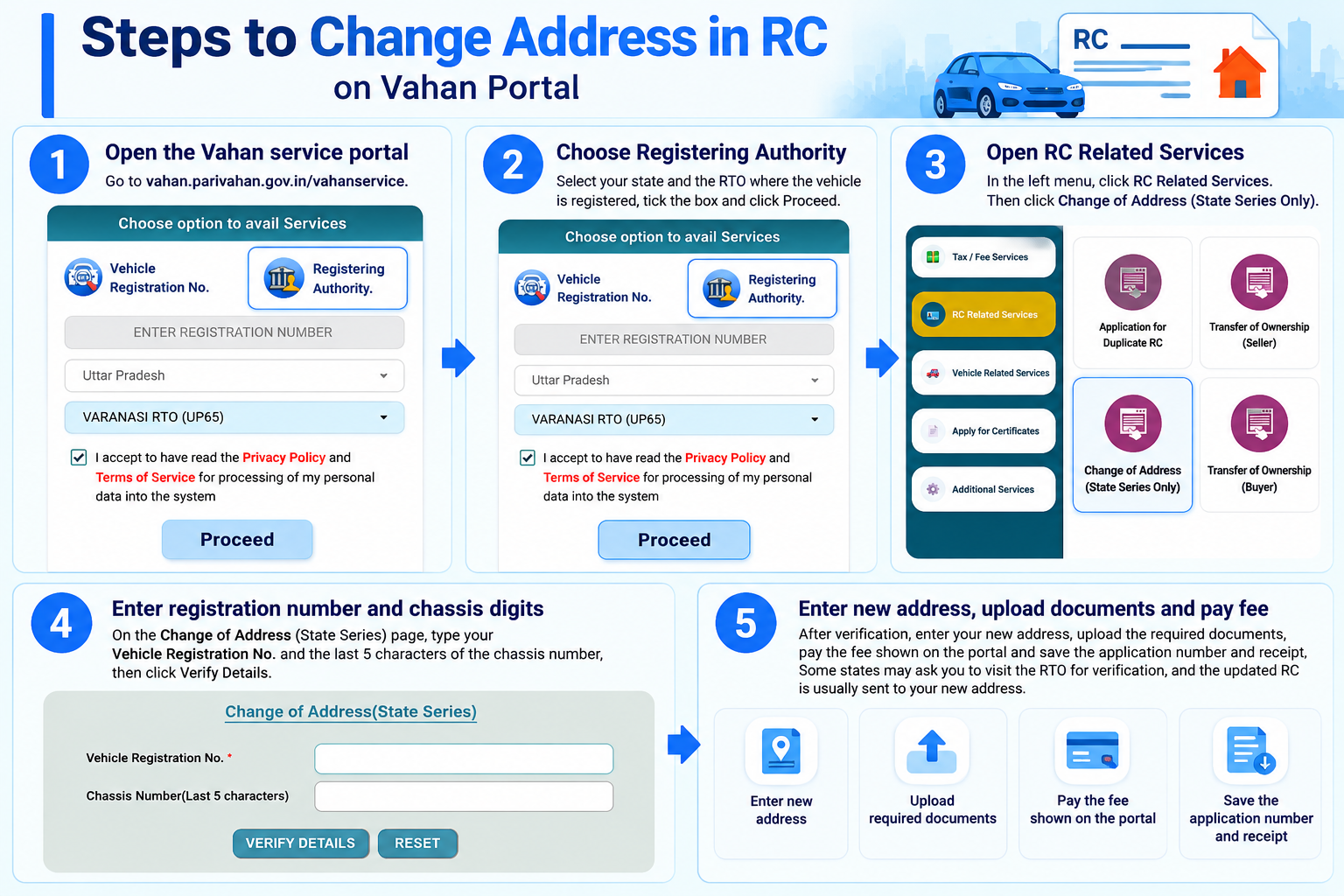
Open the Vahan service portal
Go to vahan.parivahan.gov.in/vahanservice. You will see a screen titled Choose option to avail Services with two choices: Vehicle Registration No. and Registering Authority.
-
Choose Registering Authority, then your state and RTO
Click Registering Authority. Select your state and the RTO where the vehicle is registered, tick the box to accept the Privacy Policy and Terms of Service, and click Proceed.
-
Open RC Related Services
In the menu on the left, click RC Related Services. You will see options such as transfer of ownership, duplicate RC and Change of Address (State Series Only). Click the address change option.
-
Enter your registration number and chassis digits
On the Change of Address (State Series) page, type your Vehicle Registration No. and the last 5 characters of the chassis number, then click Verify Details. Use Reset if you need to start over.
-
Enter the new address and upload documents
Once your details are verified, the portal asks for your new address and the supporting documents. Type the address exactly as it appears on your address proof, and upload clear scans. Follow the prompts on your screen, since the fields can differ by state.
-
Pay the fee and keep your receipt
Pay the fee the portal shows, and save the application number and payment receipt. Some states may ask you to visit the RTO for verification.
What changes on your RC and what stays the same
| Same state | Different state | |
|---|---|---|
| Address on RC | Updated to the new one | New registration in the new state |
| Registration number | Stays the same | Changes to a new state number |
| Chassis and engine number | Same | Same |
| Owner name | Same | Same |
This table is a general guide. Your state and RTO can apply their own rules, so follow what the portal shows.
If you have moved to another state
An address change alone is not enough once the vehicle is being used in a new state.
Under Section 47 of the Motor Vehicles Act, when a vehicle registered in one state is kept in another state for more than 12 months, the owner must apply for a new registration in the new state within the period the rules prescribe. For this you normally take a no objection certificate (NOC) from the RTO where it was first registered, and then apply for a new registration in the new state. The vehicle then gets a new registration number.
Because this depends on your state and the RTO, check the steps with both RTOs before you start. It is a separate process from the online address change described above.
The same idea applies to your driving licence. Our DL address change guide covers the steps for a licence.
After you apply
- Keep the receipt and application number. You will need them to follow up if the RC does not arrive.
- Inform your insurer of your new address too.
- Track your application. Use the application status option on the Vahan portal with your application number, and note the RTO’s contact details in case it stays pending.
- Check your mobile number on record. If it is old, update it on Vahan so OTPs and notices reach you.
- Keep your old RC safe until the updated one reaches you, in case the RTO asks for it.
- Check the new RC. Make sure the address, and your name, are printed correctly, and report a mistake to the RTO at once.
Related guides: duplicate RC, transfer of ownership and downloading your RC. Do not forget your licence: our DL address change guide explains how to change the address on your DL too.
Mistakes to avoid, and a quick checklist before you submit
- Address that does not match the proof. Type it exactly as it is written on your address document.
- Wrong chassis digits. Enter the last 5 characters exactly as printed on the RC, including any letters.
- Paying an agent or a lookalike website. Use only the official Vahan portal on parivahan.gov.in, and pay only on the portal’s own payment page.
Before you submit: registration number checked, chassis digits checked, address typed as on the proof, documents clear and readable, payment receipt saved.
Good to know
What does State Series Only mean?
It means the online option is for vehicles with a normal state-series registration. If your vehicle is registered under another series, ask your RTO what applies.
Where do I find the last 5 characters of my chassis number?
The chassis number is printed on your RC. Enter its last 5 characters, exactly as written.
Do I need to visit the RTO?
Many states process the request online, but some may ask you to visit the RTO for verification. The portal or your RTO will tell you.
How long does the updated RC take to arrive?
It varies by state and RTO, so we do not promise a time. Keep your application number and follow up with the RTO if it seems delayed.
Can I sell the vehicle without changing the address?
You can, but a mismatch between the RC and the buyer’s or seller’s proofs can cause delays in the transfer. It is easier to update the address first.
I live in a rented house. Which address proof works?
This depends on your state. Many places accept documents like Aadhaar with the new address, but check the list shown on the portal or ask your RTO.
Disclaimer: MyRTOBuddy is an independent guide and is not affiliated with any government body. This is general information and not legal advice. Steps, documents and fees can change and differ by state, so confirm them on the official portal or with your RTO.
Ready to update your RC address?
This takes you straight to the official Vahan portal. myrtobuddy.com is not affiliated with it.